Sky Italia Streaming Errors Explained Step By Step
Estimated reading time: 11 to 13 minutes.
Sky Italia streaming errors can look simple on the screen, but the cause behind them is usually not simple. A loading message, playback failure, black screen, frozen image, or repeated error code may all come from different technical layers. This is why guessing rarely solves the problem.
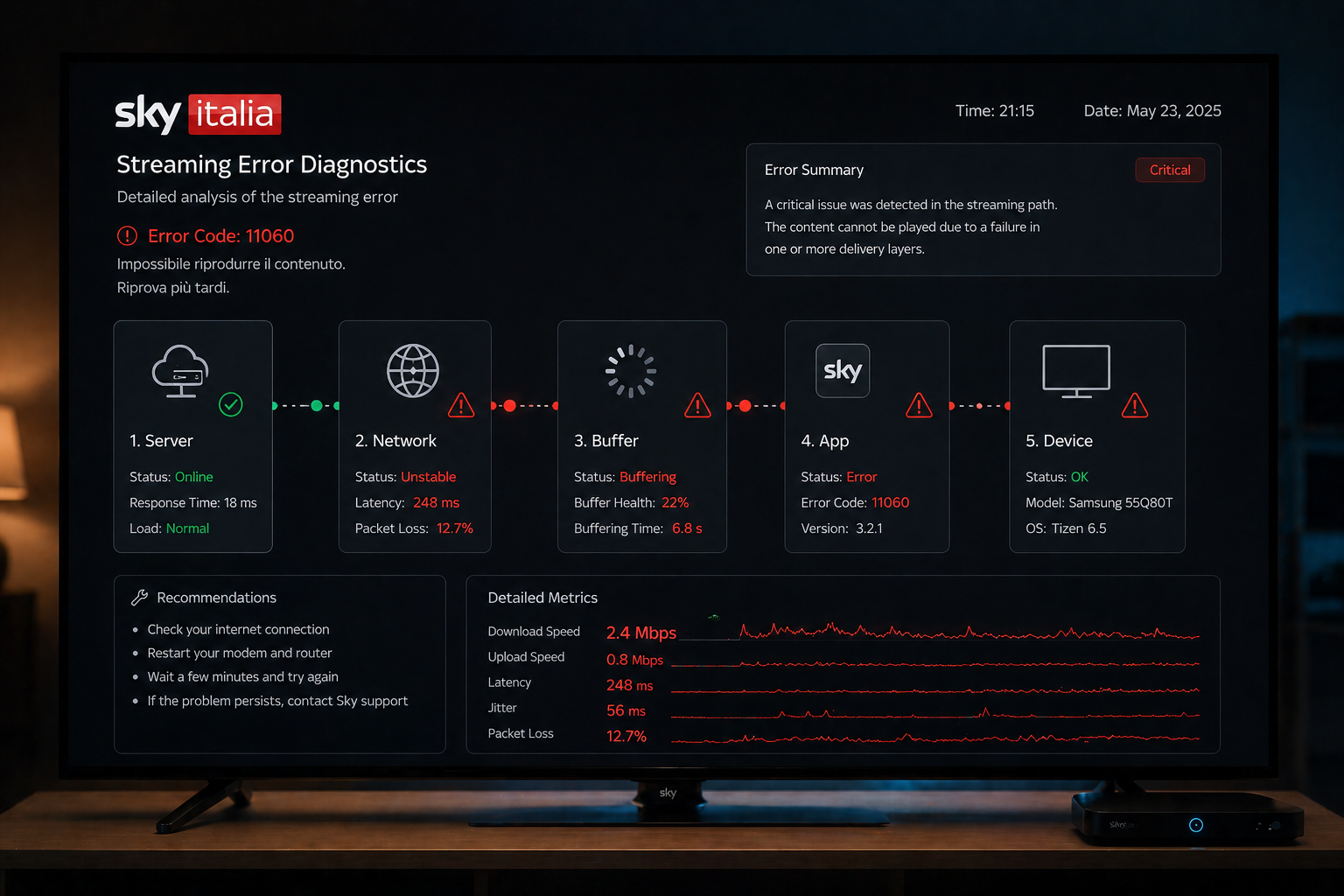
The best way to understand streaming errors is to follow the chain step by step. Sky Italia streaming depends on authentication, server response, network delivery, buffering, app behavior, and device processing. If one layer fails, the final result appears as a visible error on your screen.
Quick Context. Sky Italia streaming errors happen when one part of the delivery chain fails. The issue may come from account access, network instability, server response, buffer behavior, app state, or device limits.
Table of Contents
What a streaming error really means
Step 1 Check authentication and access
Step 4 Check buffering behavior
Step 5 Check app state and cache
What a streaming error really means
A streaming error means the playback system cannot complete one required step. It does not always mean the whole service is unavailable.
The app may fail to verify access. The server may respond slowly. The network may delay video data. The buffer may run out. The device may fail to decode the stream properly.
All of these situations can produce similar visible errors, even though the technical causes are different.
Step 1 Check authentication and access
The first layer is authentication. Before playback begins, the app must confirm that the account has access to the selected content.
If this step fails, channels may not open, login may repeat, or playback may stop before starting.
This can happen because of expired sessions, delayed verification, or temporary communication problems between the app and authentication servers.
The practical check is simple. Log out, restart the app, then log in again. This refreshes the session and forces a new access check.
Step 2 Check server response
After access is confirmed, the app requests stream information from servers. This includes available quality levels, stream links, and playback data.
If the server response is delayed or incomplete, the app may show an error before video starts.
This type of issue may appear during busy periods or major live events when demand is high.
If the same error appears on multiple devices at the same time, the cause may be outside your local setup.
Step 3 Check network delivery
The network is the path between the server and your device. It must deliver video segments continuously and in the correct order.
Streaming does not need only high speed. It needs stable timing. Packet delay, packet loss, latency spikes, and congestion can all create errors.
This is why a speed test may look good while Sky Italia still fails. The test measures capacity, but streaming depends on consistency.
Testing Ethernet instead of WiFi is one of the best ways to isolate network instability.
Step 4 Check buffering behavior
The buffer stores video data before playback. It protects the stream from small network fluctuations.
If data arrives too slowly, the buffer empties. When the buffer cannot recover, playback stops or shows an error.
Buffer errors often appear as repeated loading, freezing, or playback restart.
This usually means the delivery chain is not stable enough to keep the buffer filled.
Step 5 Check app state and cache
The app stores temporary data such as sessions, settings, and playback information. Sometimes this data becomes outdated or corrupted.
When this happens, the app may send incorrect requests or fail to load streams correctly.
Restarting the app can fix temporary state problems. Clearing cache or reinstalling the app can help when the issue repeats.
This is especially useful when the problem affects only one device.
Step 6 Check device performance
The final layer is the device itself. It must decode video, manage memory, handle app processes, and render frames smoothly.
Older devices may struggle with modern streaming requirements. Low memory, weak processors, overheating, or outdated software can all trigger errors.
If Sky Italia works on one device but fails on another, the problem is probably device related.
Updating the device system and closing background apps can improve stability.
Real world diagnosis example
Imagine Sky Italia shows a playback error during a live match. First, check whether the account is still logged in. Then test another channel. After that, test another device on the same network.
If all devices fail, server load or network delivery may be involved. If only one device fails, the app or hardware is more likely responsible.
If WiFi fails but Ethernet works, the issue is local wireless instability.
For deeper technical background, see this guide Sky Italia Performance Issues Explained.
| Step | Layer | Possible Cause | Visible Result |
|---|---|---|---|
| 1 | Authentication | Expired session or access delay | Login error or blocked playback |
| 2 | Server response | Slow or incomplete stream data | Channel fails to start |
| 3 | Network delivery | Latency, packet loss, or congestion | Buffering or error message |
| 4 | Buffer | Data runs out before playback continues | Freeze or loading loop |
| 5 | App state | Cache or temporary data problem | Repeated app error |
| 6 | Device | Low memory or weak processing | Crash, lag, or failed playback |
Reality Check
Streaming errors are rarely solved by one universal fix. The same error on screen can come from different technical causes. The correct approach is to isolate each layer one by one.
Final Verdict
Sky Italia streaming errors become easier to understand when you follow the delivery chain step by step. Authentication, server response, network delivery, buffering, app state, and device performance all matter. A visible error is only the final symptom. The real solution comes from identifying which layer failed and fixing that specific point instead of guessing.
FAQ
| Question | Answer |
|---|---|
| Why do Sky Italia streaming errors happen | They happen when one layer of the streaming chain fails. |
| Are streaming errors always network related | No. They can also come from login, app, server, buffer, or device issues. |
| Why does the same error repeat | The app may have a cache problem or the same technical layer may be failing repeatedly. |
| Can Ethernet help with streaming errors | Yes. Ethernet can reduce WiFi instability and improve delivery consistency. |
| What is the best first step | Test another device and another connection type to isolate the cause. |